Frutiger Aero for dsh
GitHub

dsh profile bundle · MIT · zero dependencies dsh profile 插件 · MIT · 零依赖

Glass, water, sky — and a phone layout that fits a thumb.

玻璃、水、天空 —— 以及终于顺手的手机布局。

A portable plugin that reskins the DeepSeek Harness browser UI in Frutiger Aero: frosted panes over a living wallpaper, aqua gloss on everything you can press, and a bright rim on every edge. On a phone it stops being a squeezed desktop and becomes an app — a drawer that slides instead of shrinking the conversation, a dock under your thumb, and a composer that stays above the keyboard.

一个可移植插件,把 DeepSeek Harness 的网页界面整体换成 Frutiger Aero:会动的壁纸之上是磨砂玻璃面板,所有可点的东西都有水感高光和明亮描边。 在手机上,它不再是被压扁的桌面端,而是一个真正的 App —— 抽屉从侧边滑出而不是挤窄正文, 导航移到底部拇指够得到的地方,输入框永远停在键盘上方。

dsh plugin --profile web add dsh-frutiger-aero
  • Desktop电脑端
  • Mobile手机端
  • Light + dark明暗双主题
  • Keyboard & touch 键鼠与触屏

Three things most skins get wrong

大多数皮肤做错的三件事

This one is built the way the product is built: through its own token system, against its own stable hooks, and with a budget for every effect it adds.

这个插件按照产品自身的方式来做:走它自己的 token 体系、用它自己稳定的钩子、 并且为每一处动效都算了开销。

The palette, not a coat of paint

换的是调色板,不是刷一层漆

Every surface, border and label in the product resolves through its semantic --dsw-alias-* tokens. Overriding that tier retints the entire application at once — including screens this plugin has never seen — and it composes with the built-in light/dark switch instead of fighting it. A red button stays red; it just becomes a glossy red button.

产品里每个表面、边框和文字都走语义化的 --dsw-alias-* token。 覆盖这一层就一次性给整个应用换色 —— 包括这个插件从没见过的界面 —— 而且它和内置的明暗切换是协作而不是打架。红色按钮还是红的,只是变成了有高光的红按钮。

A phone layout, not a shrunken desktop

是手机布局,不是缩小的桌面端

Below 1024px the stock frame keeps the sidebar in the grid and squeezes everything else: on a 390px phone the transcript gets 108px. Here the sidebar becomes an overlay drawer, the rail moves off-canvas, and a glass dock takes over — and a conversation that declares a 680px-wide reading measure stops being clipped into left-edge slivers.

窄于 1024px 时,原生框架仍把侧栏留在网格里挤压其他一切:390px 手机上聊天记录只剩 108px。这里侧栏变成覆盖式抽屉,图标栏移出画布,换成底部玻璃 dock —— 同时修掉了「阅读宽度写死 680px 下限」导致每轮消息被裁成左边一条的问题。

Effects that know when to stop

动效知道什么时候该停

A tier governor classifies the device from signals that cost nothing, then samples real frame pacing for a second and downgrades once if they disagree. Only transform and opacity are ever animated. A hidden tab pauses everything.

分级治理先用零成本信号判断设备,再采样约一秒真实帧率,不一致就只降一次。 全程只动 transformopacity。标签页切到后台,一切暂停。

On a phone

在手机上

Built for touch first, then verified with real touch input — CDP swipes and taps, not synthetic events — across portrait, landscape and small phones.

先按触屏来做,再用真实触摸输入验证 —— CDP 滑动与点击,不是合成事件 —— 覆盖竖屏、横屏和小屏手机。

  • A drawer that slides over the content instead of stealing width from it, with a scrim that dismisses it and takes the tap that would have scrolled the page behind.
  • 覆盖式抽屉从内容上方滑出,而不是抢占正文宽度;遮罩可以点击关闭, 并吃掉本该滚到背后页面的那一下触摸。
  • Edge-swipe gestures — swipe from the left edge to open, swipe left to close, and vertical intent hands the gesture straight back to the scroller.
  • 边缘滑动手势 —— 从左边缘滑开、向左滑关;一旦判定为竖向意图, 手势立刻交还给滚动容器。
  • A dock under your thumb, whose buttons click the product's own controls by accessible name rather than reimplementing anything.
  • 拇指区的底部 dock,按钮通过无障碍名称去点击产品自己的控件, 不重复实现任何逻辑。
  • A keyboard-aware composervisualViewport publishes the occluded height, so the input lifts by exactly that much on iOS, where the layout viewport never resizes.
  • 感知键盘的输入框 —— 用 visualViewport 发布被遮挡高度, 在布局视口不缩放的 iOS 上把输入框精确抬起那么多。
  • Touch ergonomics — 44px targets on coarse pointers, a 16px input floor that stops iOS's sticky focus zoom, momentum scrolling, contained overscroll, no tap highlight, and light haptics on press.
  • 触屏人体工学 —— 粗指针下 44px 触控目标、16px 输入下限(治 iOS 聚焦缩放)、 惯性滚动、overscroll 收敛、去掉点击高亮、按下时轻震动。
  • Safe areasviewport-fit=cover plus env(safe-area-inset-*) on the drawer, the dock and the composer, and 100dvh instead of 100vh.
  • 安全区适配 —— viewport-fit=cover 配合抽屉、dock、输入框上的 env(safe-area-inset-*),并用 100dvh 取代 100vh
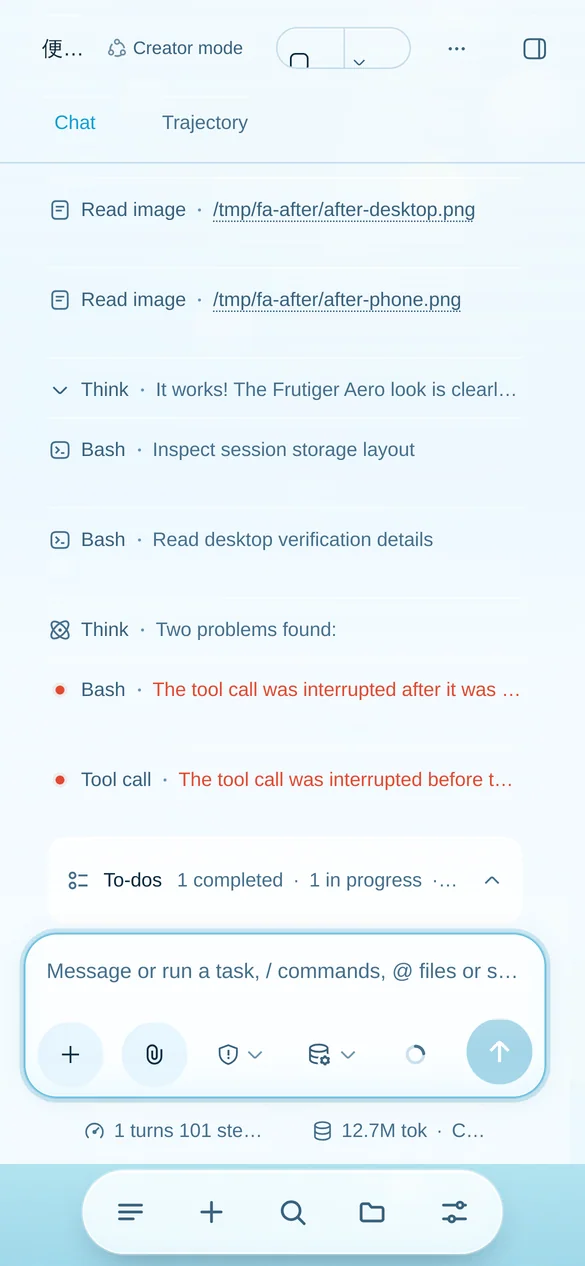
The dsh chat on a phone with the Frutiger Aero skin: a frosted glass composer, a glass to-do bar and a floating glass dock
Light — glass over sky
浅色 —— 天空之上的玻璃
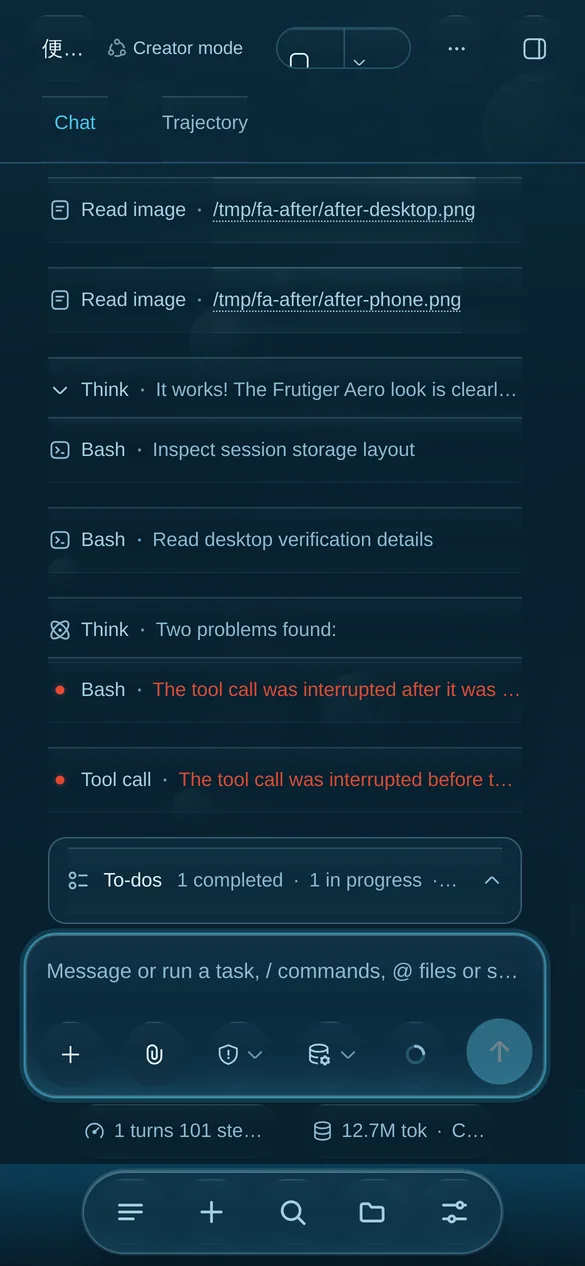
The same phone view in the dark scheme: deep water, bioluminescent bubbles and a cyan-rimmed composer
Dark — light under water
深色 —— 水下的光
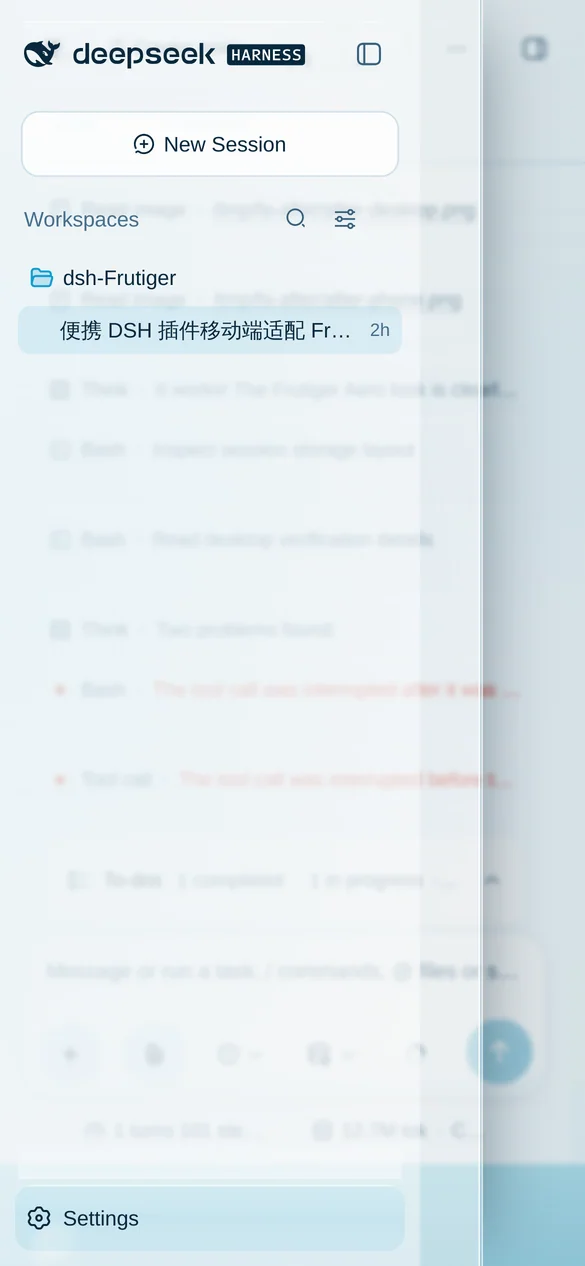
The navigation drawer open over the conversation, with a dimming scrim behind it
The drawer, over the content
抽屉覆盖在正文之上

On a desktop, nothing is taken away

在电脑上,什么都不会被拿走

The three-column layout, the drag-to-resize handles, dialogs, menus, text selection, wheel scrolling and keyboard input all still work — the skin adds material and changes no behaviour.

三栏布局、拖拽调宽手柄、弹窗、菜单、文字选择、滚轮滚动与键盘输入全部照常 —— 这层皮肤只增加材质,不改变行为。

29/29 interaction checks pass on a phone and on the desktop 交互断言在手机端与电脑端全部通过
0 runtime dependencies — the browser half requires nothing at all 运行时依赖 —— 浏览器端不 require 任何模块
2 product-level mobile defects fixed, not worked around 顺手修掉的产品级移动端缺陷
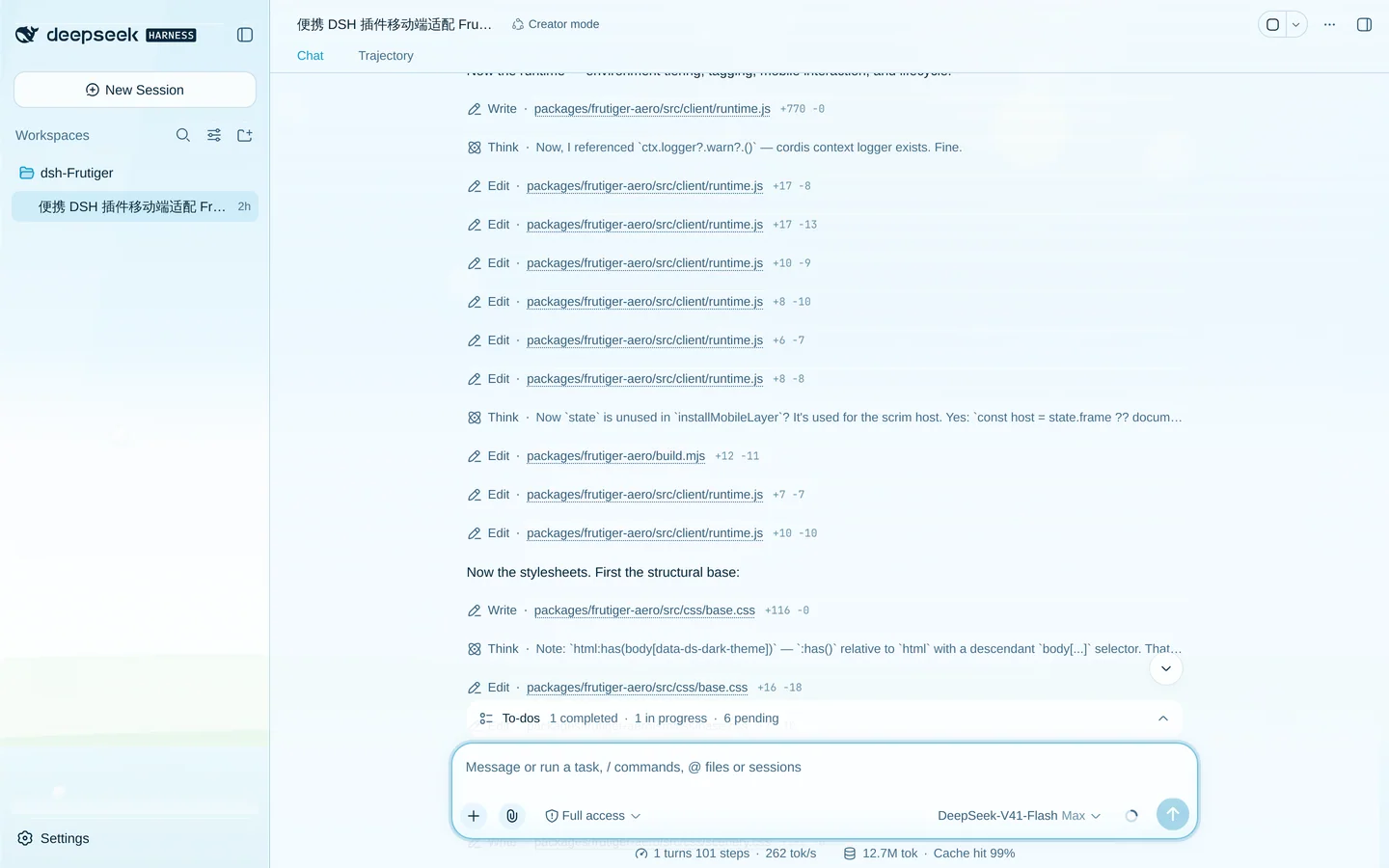
The dsh desktop layout in the dark scheme: a deep-water wallpaper behind frosted glass panes, with aqua accents

Install

安装

Three ways in. The first needs only dsh and a package manager; the second needs neither an npm account nor git; the third is for hacking on the plugin itself.

三种方式。第一种只需要 dsh 和包管理器;第二种既不需要 npm 账号也不需要 git;第三种是给要改插件本身的人用的。

1 · npm one-liner 1 · npm 一行命令 recommended 推荐

dsh plugin --profile web add dsh-frutiger-aero

Installs the latest version and registers it as a profile bundle. Reload the web UI and it is on.

装上最新版本并注册为 profile bundle。刷新网页界面即可生效。

2 · GitHub installer 2 · GitHub 安装脚本 no npm account 无需 npm 账号

curl -fsSL https://raw.githubusercontent.com/Hotsteel2901/dsh-frutiger-aero/main/install.sh | sh

Downloads the latest release and installs it into a profile — no package manager, no build step. On Windows, use install.ps1 from the repository instead.

下载最新发布版并装进 profile —— 不需要包管理器,也不需要构建。Windows 请改用仓库里的 install.ps1

3 · From a clone 3 · 从克隆仓库安装 for development 开发用

git clone https://github.com/Hotsteel2901/dsh-frutiger-aero && cd dsh-frutiger-aero && node install.mjs

Then dsh --profile frutiger --port 3099 --no-open and open the URL it prints. Add --link to symlink the checkout so a rebuild is live.

然后运行 dsh --profile frutiger --port 3099 --no-open,打开它打印的地址。 加 --link 可以改为软链接,重新构建即时生效。

What it costs

开销是多少

The one genuinely expensive property in the whole design is backdrop-filter, and it is gated twice: off below the top tier, and applied only to panes smaller than the viewport.

整个设计里唯一真正昂贵的是 backdrop-filter,它被门控了两次: 低于最高档直接关闭,且只用在比视口小的面板上。

Tier 档位 Chosen when 触发条件 Wallpaper 壁纸 Blur 模糊
full fine pointer, ≥ 3 cores, ≥ 4 GB 精细指针、≥ 3 核、≥ 4 GB 22 bubbles, caustics, light shafts, grain 22 个气泡、水面焦散、光束、颗粒 yes
lite coarse pointer, small screen, ≤ 4 cores, save-data, reduced motion 粗指针、小屏、≤ 4 核、省流量、减少动效 10 bubbles 10 个气泡 no
off explicit ?frutiger=off 显式 ?frutiger=off none — palette and layout only 无 —— 只保留配色与布局 no

Questions worth asking

值得问的问题

Does it break the app, or leak outside the theme? 会不会弄坏应用,或者污染主题之外的东西?

The host half is an empty apply() — no service, no tool, no session state. The browser half paints and nothing else: stylesheets, nodes it owns, passive listeners, and attributes on nodes the product owns. Every one of them is released through ctx.effect, so setting disabled: true on the row in cordis.patch.yml returns the page to stock.

宿主端是一个空的 apply() —— 没有服务、没有工具、不碰会话状态。 浏览器端只负责绘制:样式表、自己创建的节点、被动监听器,以及产品自己节点上的属性。 每一项都通过 ctx.effect 释放,所以在 cordis.patch.yml 里 把这一行设为 disabled: true 就完全恢复原样。

Will it fight my other plugins? 会不会和其他插件打架?

Anything built on the --dsw-* tokens gets retinted along with the rest of the app, which is usually what you want. A plugin that hardcodes its own colours, or paints a full-viewport backdrop-filter, can still clash — that is a real limitation, not a hypothetical one, and the honest answer is to try it.

任何基于 --dsw-* token 的界面都会跟着一起换色,这通常正是你想要的。 但如果某个插件把颜色写死,或者在整屏上铺 backdrop-filter,仍可能冲突 —— 这是真实存在的限制,不是假设,诚实的答案是装上去试试。

How do I turn it down or off? 怎么调低或关掉?

Per browser: window.__FRUTIGER__.setEffects('lite'), or ?frutiger=off / ?frutiger=lite / ?frutiger=full on the URL. Permanently: node install.mjs --uninstall, which removes the package and its bundle entry and keeps the profile and its sessions.

单个浏览器:window.__FRUTIGER__.setEffects('lite'),或者在地址栏加 ?frutiger=off / ?frutiger=lite / ?frutiger=full。 永久移除:node install.mjs --uninstall,它会删掉包和 bundle 条目, 保留 profile 与会话。

Which clients does it work with? 支持哪些客户端?

It is a browser-surface plugin: anything that runs the dsh Web UI — including desktop clients that embed it — gets the same skin. It is client-agnostic by construction because it targets the product's own tokens and hooks rather than one client's DOM.

这是一个浏览器界面插件:任何承载 dsh Web UI 的东西 —— 包括内嵌它的桌面客户端 —— 都会得到同一层皮肤。它天然与客户端无关,因为它针对的是产品自身的 token 与钩子, 而不是某一个客户端的 DOM。